
 en
en![The Ultimate Pro Settings: How to Play like a Pro in Valorant [Updated 2025]](/_next/image/?url=https%3A%2F%2Fwww.strafe.com%2Fesports-betting%2Fstrafe-news%2Fwp-content%2Fuploads%2Fsites%2F29%2FChamber-valorant-tour-de-force.jpg.webp&w=3840&q=50)
The Ultimate Pro Settings: How to Play like a Pro in Valorant [Updated 2025]
In competitive VALORANT, settings are crucial—they can make the difference between a quick reaction and a costly miss. Optimizing your settings is a fast and effective way to gain an edge. By adjusting specific in-game settings that improve FPS, reduce input lag, and enhance visibility, players can elevate their gameplay almost immediately.
Graphics, Audio and Overall Configurations
General VALORANT settings
First, choosing the right enemy highlight color is essential. Yellow looks to be the first go-to option since it stands out across various map designs. Other colors, like red, can blend in on certain VALORANT maps like and make it harder to spot opponents. Experiment with different colors to find what suits your vision best.

Mouse sensitivity
When it comes to mouse settings, consistency is key. Lower sensitivities tend to yield more stable aim, making it easier to learn solid movement fundamentals. A sensitivity range between 0.2 and 0.4 at 800 DPI is generally recommended, with 1600 DPI emerging as an alternative choice for some. Keep scoped sensitivity and ADS sensitivity at 1 to maintain uniform movement, and enable raw input buffer to avoid any Windows interference with mouse input.

Minimap
Optimizing the minimap ensures situational awareness, compensating for times when teammates may not communicate effectively. Disabling "player centered" on the minimap allows a wider view, maximizing the display to 1.2 size. Adjust zoom to around 0.9 to 0.93 for clear vision of the whole map. Keep "minimap vision cones" on to track teammates’ line of sight and identify smoked areas. Enabling “region map names” also provides callouts, improving communication.

Graphics Settings
One of the most impactful changes for VALORANT performance is display mode. Using full-screen mode instead of windowed full-screen minimizes input lag. Pair this with the highest refresh rate available on the monitor for smooth gameplay. For NVIDIA Reflex low latency, on + boost is recommended for GPUs from the 20 series onward, while earlier models perform best with the setting on.
Best Graphics settings to maximize your FPS
- Resolution: Stick to your monitor's native resolution, usually 1920x1080 at a 16:9 aspect ratio. Unlike Counter-Strike, lowering the resolution in Valorant does not provide significant advantage.
- Multi-threaded rendering: On
- Material, Texture, Detail, and UI Quality: Low
- Vignette: Off
- VSync: Off
- Anti-Aliasing: Off
- Anisotropic Filtering: Lowest setting
- Improved Clarity: On (if your system can handle it)
- Bloom, Distortion, First Person Shadows: Off
- Limit FPS: Off
- Digital Vibrance: Boost your Digital Vibrance settings through your graphics card control panel.
Tip from the Pros: enable stats to monitor your client FPS, network round trip time, and packet loss. This helps identify performance issues.
Keybinds
Customizing keybinds can significantly affect movement and ability use, especially for VALORANT duelists where you are quickly clearing space like Neon and Raze or if you are holding angles and need to quickly get out of there like Jett and Chamber. Many players assign abilities to mouse buttons, enabling full movement control while activating them.
It’s advisable to bind voice chat to keys that allow easy movement while communicating, like using the pinky or thumb for push-to-talk. Additionally, mouse wheel jump is popular among players for smoother movement.
Equipment and Combat Preferences
If you are play with scoped weapons like the Operator, it’s advisable to select “hold” for sniper rifle aim. This mode allows quicker adjustments and aligns with how most pros use scoped weapons. Binding zoom to a mouse button or wheel provides faster control over zoom levels. Unbinding “cycle next/previous weapon” is another efficiency tip, encouraging players to use number keys to switch weapons more quickly and accurately.
Audio and 3D Sound Optimization
The right audio settings will help identify enemy locations. High-Resolution Transfer Function (HRTF) is a crucial feature for spatial sound, enabling players to better gauge footsteps and gunfire direction.
Disabling background music in menus keeps focus sharp during matches, while maintaining crucial in-game audio settings. By optimizing these settings, players can play like their favorite professional player with improved reaction times, clear visuals, and efficient controls.
Mouse, Keyboard and many other Gears used by the Pros
By knowing the gear and setups used by professional players, you can refine your setup to maximize performance and consistency. This section was based on a ProSettings report that gathered information from 424 pro players setups, including peripherals and equipment commonly used by them (and the % of players who use them)
Mouse
A quality mouse is one of the most important tools for aiming precision. These mice prioritize lightweight designs and advanced sensors to deliver consistent, accurate tracking during high-intensity play.
- Razer Viper V3 Pro - 22%
- Logitech G Pro X Superlight - 21%
- Logitech G Pro X Superlight 2 - 11%
- Razer Deathadder V3 Pro - 11%
- Razer Viper V2 Pro - 4%
Mouse Settings used by Pro VALORANT Players
To fine-tune aiming precision, professional players tend to use the following mouse settings. These settings enable pros to maintain stable control over their aim.
- Average eDPI (Effective DPI): 261
- Average Sensitivity: 0.34
- Most Used DPI: 800
- Zoom Sensitivity: 1
- Polling Rates:
- 1000 Hz: 75%
- 4000 Hz: 13%
- 2000 Hz: 7%
- 8000 Hz: 5%
Keyboard
Keyboards with fast, responsive keys help pros execute commands quickly. Mechanical keyboards are preferred for their tactile feedback and reliability, which can enhance reaction time and gameplay fluidity.
- Wooting 60 HE - 29%
- Razer Huntsman V3 Pro TKL - 15%
- Razer Huntsman V3 Pro Mini- 8%
- Logitech G Pro X - 6%
- Steelseries Apex Pro TKL - 2%
Monitor
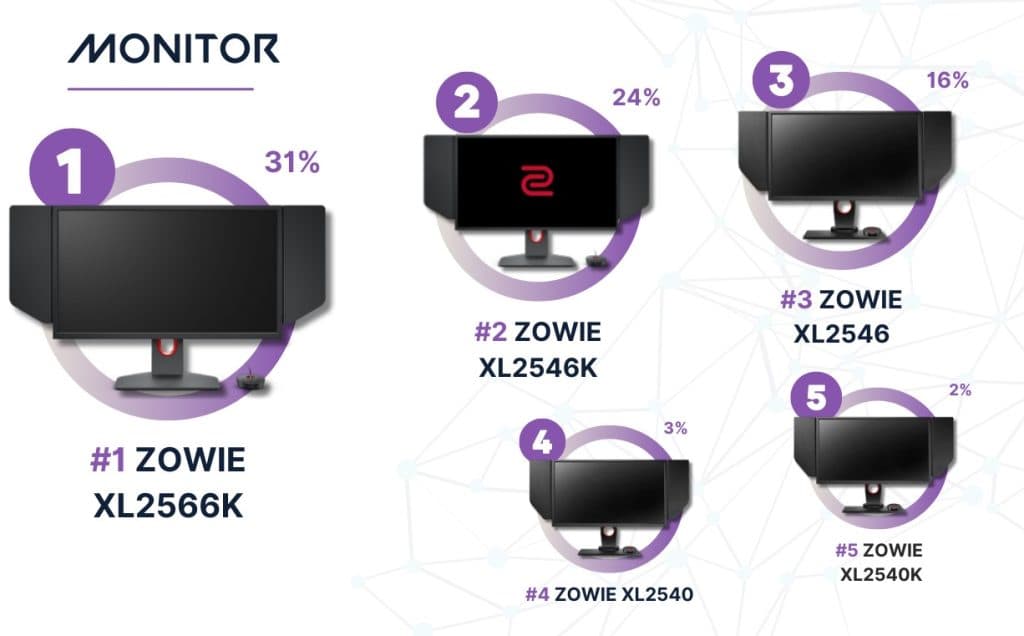
A high refresh rate and low response time are vital for spotting enemy movements and achieving smooth visuals. Zowie monitors are known for their sharp refresh rates, ensuring pros can track movements in real-time with minimal blur.
- Zowie XL2566K - 31%
- Zowie XL2546K - 24%
- Zowie XL2546 - 16%
- Zowie XL2540 - 3%
- Zowie XL2540K - 2%
Resolutions used by Pro VALORANT Players
For a clear and consistent visual experience, pros typically stick with these resolutions:
- 1920x1080 - 75%
- 1280x960 - 15%
The 1920x1080 resolution is favored for its clarity and broad field of view, while 1280x960 remains an alternative for players who prefer stretched visuals.
Headset
Audio is crucial for in-game awareness, enabling pros to hear subtle sounds like footsteps. These headsets were considered when Pro Players are at their home or gaming houses, as in-person tournaments provide their own headset to all teams.
- Razer Blackshark V2 Pro - 27%
- HyperX Cloud II - 24%
- Logitech Pro X - 12%
- Logitech G Pro X Wireless - 3%
- HyperX Cloud II Wireless - 2%
Mouse Pad
A smooth, durable mouse pad can support consistent aim control. The top choices are:
- Artisan Zero - 18%
- Zowie G-SR-SE - 9%
- Logitech G640 - 7%
- Vaxee PA - 6%
- Steelseries QCK Heavy - 6%
Wired vs Wireless Hardware: Pros and Cons
Choosing between wired and wireless gaming hardware is often a balancing act between performance, aesthetics, convenience, and personal preference. Here’s a breakdown of the key pros and cons to help determine which option best enhances your gaming experience:
Wired Hardware
Pros:
- Lower Latency: Wired devices generally have faster response times, essential for competitive gaming where milliseconds count.
- Stable Connection: Wired setups are free from interference issues often associated with wireless connections, providing more consistent performance without interruptions.
- Battery-Free Operation: Since wired devices draw power directly from the PC, there's no need to worry about charging, making them low-maintenance and reliable.
Cons:
- Mobility Constraints: Wires can restrict movement, which is particularly noticeable in devices like mice and headphones. This limitation can impact your freedom of movement.
- Cable Management: Cables can add clutter, requiring effort to organize and often creating a less streamlined, bulkier look.
Wireless Hardware
Pros
- Freedom of Movement: Wireless devices offer greater mobility, which can be ideal for those with limited desk space or a preference for a clean, minimal aesthetic. This benefit is especially valuable for players using a large mousepad or low sensitivity for precise aiming in FPS games.
- Ease of Setup: Without cables, setting up and rearranging your devices is often more straightforward, allowing for a tidier workspace.
Cons:
- Potential for Latency: While modern wireless technology has significantly reduced latency, some gamers still prefer wired connections for the assurance of minimal lag.
- Battery Dependency: Wireless devices require battery monitoring and occasional recharging, which can be a nuisance during extended play sessions.
- Interference Issues: Wireless signals may encounter interference from other devices, which could lead to connectivity disruptions, particularly in crowded network environments.
BONUS: Pro VALORANT Players Crosshair Codes
If you still want to one extra mile, why not mimic your favorite Player's crosshair? Here we have a comprehensive list with A LOT of different crosshairs (updated this October) to help you feel like that Pro Player you like so much!
| PLAYER | CROSSHAIR CODE |
|---|---|
| Aaron “mindfreak” Leonhart | 0;P;c;1;h;0;d;1;0l;5;0o;0;0a;1;1b;0 |
| Adil “ScreaM” Benrlitom | 0;s;1;P;c;5;o;1;d;1;z;3;f;0;0t;6;0l;0;0a;1;0f;0;1b;0;S;c;6;s;0.949;o;1 |
| Adrian “invy” Reyes | 0;s;1;P;o;1;f;0;0t;1;0l;1;0o;2;0a;0;0f;0;1t;1;1l;1;1v;3;1o;3;1a;0;1m;0;1f;0;S;o;0.8 |
| Aleksander “zeek” Zygmunt | 0;s;1;P;u;003300FF;o;1;d;1;0t;0;0l;16;0v;11;0g;1;0o;0;0f;0;1b;0;S;c;0;s;1.417;o;1 |
| Alexander “jawgemo” Mor | 0;P;h;0;f;0;0t;4;0l;1;0o;2;0a;1;0f;0;1b;0 |
| Alexandre “xms” Forté | 0;p;0;P;c;1;u;00008BFF;h;0;f;0;s;0;0l;10;0v;8;0o;2;0a;1;0f;0;1b;0 |
| Alexis “Newzera” Humbert | 0;s;1;P;c;1;u;910091FF;h;0;f;0;0t;1;0l;4;0o;1;0a;1;0f;0;1b;0;S;c;5;o;0 |
| Ali “AsLanM4shadoW” Balta | 0;P;o;1;f;0;0l;4;0v;4;0o;2;0a;1;0f;0;1b;0 |
| Andrey “Shao” Kiprsky | 0;P;c;7;t;2;o;1;d;1;z;3;a;0;f;0;0t;10;0l;2;0o;2;0a;1;0f;0;1b;0 |
| Angelo “keznit” Mori | 0;P;c;4;h;0;0b;0;1l;4;1o;2;1a;1;1m;0;1f;0 |
| Apiwat “GarnetS” Apiraksukumal | 0;p;0;s;1;P;o;0;f;0;0t;1;0l;4;0o;1;0a;1;0f;0;1t;1;1l;1;1o;0;1a;0;1m;0;1f;0;A;o;1;0t;1;0l;1;0o;0;0a;0;0f;0;1t;1;1l;1;1o;0;1a;0;1m;0;1f;0 foxz – 0;c;1;s;1;P;c;5;h;0;0l;3;0o;0;0a;1;0f;0;1b;0;S;c;5;s;0.812;o;1 |
| Ardis “ardiis” Svarenieks | 0;s;1;P;h;0;0l;3;0o;0;0a;1;0f;0;1b;0 |
| Arthur “tuyz” Vieira | 0;s;1;P;u;000000FF;h;0;f;0;m;1;0l;3;0v;3;0o;2;0a;1;0f;0;1b;0 |
| Auni “AvovA” Chahade | 0;p;0;s;1;P;c;5;h;0;f;0;0l;4;0o;2;0a;1;0f;0;1b;0;A;h;0;0l;4;0o;0;0a;1;0f;0;1b;0 |
| Austin “crashies” Roberts | 0;s;1;P;c;1;h;0;f;0;0l;4;0o;2;0a;1;0f;0;1b;0 |
| Ayaz “nAts” Akhmetshin | 0;P;c;1;o;1.000;m;1;0a;1.000;0l;2;0t;1;0o;2;0f;0;1b;0;1m;0;1f;0 |
| Benedict “Benkai” Tan | 0;P;c;5;o;1;d;1;f;0;0t;0;0l;0;0o;0;0a;0;0f;0;1b;0 |
| Benjamín “adverso” Poblete | 0;P;c;7;h;0;0l;3;0o;2;0a;1;0f;0;1b;0 |
| Brendan “BcJ” Jensen | 0;p;0;s;1;P;u;7D0901FF;o;0;f;0;m;1;0l;4;0v;5;0o;0;0a;1;0f;0;1b;0;A;o;1;d;1;0b;0;1b;0 |
| Bryan “pANcada” Luna | 0;P;h;0;f;0;0l;3;0o;2;0a;1;0f;0;1b;0 |
| Byeon “Munchkin” Sang-beom | 0;p;0;s;1;P;c;6;h;0;f;0;0l;4;0o;2;0a;1;0f;0;1b;0;A;c;7;o;0;d;1;z;3;0b;0;1b;0 |
| Cahya “Monyet” Nugraha | 0;s;1;P;c;8;u;000000FF;h;0;b;1;f;0;m;1;0l;4;0v;4;0o;0;0a;1;0f;0;1b;0;S;s;0.677;o;1 |
| Cauan “cauanzin” Pereira | 0;P;h;0;0l;3;0o;2;0a;1;0f;0;1b;0 |
| Corbin “C0M” Lee | 0;P;o;1;f;0;s;0;0t;1;0l;3;0o;2;0a;1;0f;0;1b;01;0b;0;1b;0 |
| David “Tehbotol” Monangin | 0;P;o;1;0t;1;0l;1;0o;2;0a;0.1;0f;0;1t;1;1l;1;1o;3;1a;0.1;1m;0;1f;0 |
| Dmitriy “dimasick” Matvienko | 0;P;c;5;o;1;d;1;z;3;0t;1;0l;1;0o;1;0a;1;0f;0;1b;0 |
| Dmitry “SUYGETSU” Ilyushin | 0;P;c;5;h;0;d;1;f;0;s;0;0l;1;0o;1;0a;1;0f;0;1b;0 |
| Doğukan “QutionerX” Dural | 0;s;1;P;o;0;f;0;0l;3;0o;2;0a;1;0f;0;1b;0;S;d;0 |
| Dom “soulcas” Sulcas | 0;s;1;P;h;0;f;0;0l;4;0o;2;0a;1;0f;0;1b;00;s;1;P;o;1;d;1;z;3;f;0;0b;0;1b;0;S;s;0.762 |
| Donghao “Life” Qu | 0;s;1;P;c;5;h;0;f;0;s;0;0l;4;0o;2;0a;1;0f;0;1b;0;S;s;0.86;o;1 |
| Douglas “dgzin” Silva | 0;s;1;P;c;4;o;1;m;1;0t;1;0l;1;0a;0;0f;0;1t;1;1l;1;1o;4;1a;0;1m;0;1f;0;S;c;0;s;0.591;o;1 |
| Elias “Jamppi” Olkkonen | 0;s;1;P;c;5;o;1;d;1;z;3;f;0;0t;6;0l;0;0a;1;0f;0;1b;0;S;c;6;s;0.949;o;1 |
| Emir Ali “Alfajer” Beder | 0;s;1;P;c;5;o;1;d;1;z;3;f;0;0b;0;1b;0;S;s;0.628;o;1 |
| Enzo “Enzo” Mestari | 0;s;1;P;c;5;h;0;f;0;0t;1;0o;1;0a;1;0f;0;1b;0;S;s;0.8 |
| Eren “Brave” Kasırga | 0;p;0;s;1;P;h;0;f;0;0l;4;0o;2;0a;1;0f;0;1b;0;A;o;1;d;1;f;0;s;0;0b;0;1b;0;S;s;0.542;o;0.768 |
| Erick “aspas” Santos | 0;P;c;5;o;1;d;1;z;3;f;0;0b;0;1b;0 |
| Eroll Jule “EJAY” Delfin | 0;s;1;P;c;5;u;000000FF;h;0;f;0;0l;4;0o;2;0a;1;0f;0;1b;0;S;t;000000FF;o;1 |
| Ethan “Ethan” Arnold | 0;P;o;1;0t;1;0o;1;0a;1;0f;0;1b;0 |
| Fabian “Shyy” Usnayo | 0;P;o;0;0b;0;1l;4;1o;0;1a;1;1m;0;1f;0 |
| Felipe “Less” Basso | 0;P;o;0;0t;1;0l;2;0o;0;0a;1;0f;0;1b;0 |
| Francisco “kiNgg” Aravena | 0;P;c;7;h;0;0l;3;0o;2;0a;1;0f;0;1b;0 |
| Gabriel “qck” Lima | 0;p;0;s;1;P;h;0;0l;5;0o;2;0a;1;0f;0;1b;0;A;o;1;d;1;f;0;s;0;0b;0;1b;0;S;s;1.263;o;1 |
| Ganesh “SkRossi” Gangadhar | 0;s;1;P;c;8;u;C0C0C0FF;o;1;d;1;b;1;0b;0;1l;0;1a;0;S;c;0;o;1 |
| Goo “Rb” Sang-min | 0;s;1;P;c;5;h;0;f;0;0l;4;0o;2;0a;1;0f;0;1b;0;S;o;1 |
| Gustavo “Sacy” Rossi | 0;P;h;0;f;0;0t;1;0l;4;0o;1;0a;1;0f;0;1t;3;1o;2;1a;1;1m;0;1f;0 |
| Hagai “Lmemore” Tewuh | 0;P;c;5;u;00FF5EFF;h;0;f;0;0t;1;0l;2;0v;3;0o;1;0a;1;0f;0;1t;0;1o;0;1a;1;1m;0;1f;0 |
| Haodong “Haodong” Guo | 0;s;1;P;c;5;o;1;f;0;0t;1;0l;2;0o;2;0a;1;0f;0;1b;0;S;s;0.64;o;1 |
| He ‘YuChEn’ Cai | 0;P;h;0;0l;3;0o;2;0a;1;0f;0;1b;0 |
| Huang “Yuicaw” Yung-chieh | 0;P;h;0;0l;5;0o;0;0f;0;1b;0 |
| İbrahim “SouhcNi” Sağır | 0;P;h;0;d;1;f;0;0l;5;0v;4;0g;1;0o;0;0a;1;0f;0;1t;0;1l;0;1o;0;1a;0;1m;0;1f;0 |
| Itthirit “foxz” Ngamsaard | 0;P;c;1;h;0;f;0;0l;5;0o;2;0a;1;0f;0;1b;0 |
| Jaccob “yay” Whiteaker | 0;P;h;0;f;0;0l;4;0o;0;0a;1;0f;0;1b;0 |
| Jacob “valyn” Batio | 0;s;1;P;h;0;f;0;0l;5;0o;0;0a;1;0f;0;1b;0 |
| Jake “Boaster” Howlett | 0;s;1;P;c;5;u;FF2B52FF;o;1;d;1;z;4;f;0;s;0;0l;0;0v;0;0o;2;0a;1;0f;0;1t;0;1l;0;1o;0;1a;0;1f;0;S;c;1;o;1 |
| James “2ge” Goopio | 0;p;0;s;1;P;h;0;f;0;s;0;0l;3;0o;2;0a;1;0f;0;1b;0;A;c;5;o;0.852;d;1;0b;0;1b;0 |
| James “Mistic” Orfila | 0;s;1;P;o;1;f;0;0t;1;0l;2;0o;2;0a;1;0f;0;1b;0 |
| Jason “f0rsakeN” Susanto | 0;s;1;P;o;1;0t;1;0l;1;0o;4;0a;1;0f;0;1t;1;1l;1;1o;3;1a;0;1m;0;1f;0;S;c;0;o;1 |
| Jayvee “DubsteP” Paguirigan | 0;P;h;0;0l;4;0o;0;0a;1;0f;0;1t;1;1l;1;1o;5;1a;0;1m;0;1f;0 |
| Jeremy “Jremy” Cabrera | 0;P;h;0;0l;4;0o;0;0a;1;0f;0;1t;1;1l;1;1o;5;1a;0;1m;0;1f;0 |
| Jessie “JessieVash” Cristy Cuyco | 0;P;c;1;o;1;d;1;0t;0;0l;0;0o;0;0a;0;0f;0;1t;0;1l;0;1o;0;1a;0;1m;0;1f;0 |
| Jim “BORKUM” Timbreza | 0;s;1;P;c;1;h;0;0l;4;0o;2;0a;1;0f;0;1b;0;S;o;1 |
| Jimmy “Marved” Nguyen | 0;P;c;1;h;0;f;0;0l;3;0o;2;0a;1;0f;0;1b;0 |
| Jittana “JitboyS” Nokngam | 0;s;1;P;c;1;u;000000FF;h;0;f;0;0l;3;0v;5;0o;2;0a;1;0f;0;1t;10;1l;0;1v;10;1o;13;1a;1;1m;0;1f;0;S;c;4; |
| Joaquin “delz1k” Espinoza Soto | 0;P;c;1;o;0;f;0;0l;3;0o;2;0a;1;0f;0;1b;0 |
| Jokūbas “ceNder” Labutis | 0;P;c;4;o;1;0t;1;0l;2;0a;1;0f;0;1b;0 |
| Jonah “JonahP” Pulice | 0;P;c;5;o;1;0t;1;0l;3;0o;1;0a;1;0f;0;1b |
| Jordan “AYRIN” He | 0;P;c;5;h;0;0l;3;0o;2;0a;1;0f;0;1b;0 |
| Joseph “ban” Seungmin | 0;P;h;0;0t;5;0l;1;0o;2;0a;1;0f;0;1b;0 |
| Juan “NagZ” Miranda | 0;s;1;P;c;1;o;1;d;1;0l;0;0o;2;0a;1;0f;0;1t;0;1l;0;1 |
| Jung-woo “Sayaplayer” Ha | 0;s;1;P;c;1;0t;1;0l;3;0o;1;0a;1;0f;0;1b;0;S;c;1;s;0.75;o;1 |
| Karel “Twisten” Ašenbrener | 0;s;1;P;c;5;u;FF0060FF;h;0;0l;5;0v;3;0o;0;0a;1;0f;0;1b;0;S;s;0.688 |
| Kelden “Boostio” Pupello | 0;P;o;0;0b;0;1t;6;1l;1;1o;3;1a;1;1m;0;1f;0 |
| Khalil “Khalil” Schmidt | 0;P;h;0;f;0;0l;4;0o;0;0a;1;0f;0;1b;0 |
| Khalish “d4v41” Rusyaidee | 0;s;1;P;c;1;h;0;0l;3;0o;2;0a;1;0f;0;1b;0;S;d;0 |
| Kim “MaKo” Myeong-kwan | 0;s;1;P;c;1;o;1;f;0;0l;4;0a;1;0f;0;1b;0 |
| Kim “Meteor” Tae-O | 0;s;1;P;c;5;h;0;f;0;0l;4;0o;2;0a;1;0f;0;1b;0;S;o;1 |
| Kim “Secret” Ha-jin | 0;s;1;P;h;0;f;0;0l;3;0o;2;0a;1;0f;0;1b;0;S;s;0.8;o;1 |
| Kim “stax” Gu-taek | 0;P;c;4;h;0;f;0;s;0;0l;4;0o;2;0a;1;0f;0;1b;0 |
| Kim “t3xture” Na-ra | 0;s;1;P;h;0;0l;3;0o;2;0a;1;0f;0;1b;0;S;o;0 |
| Kim “Zest” Gi-seok | 0;s;1;P;c;1;o;1;f;0;0l;4;0a;1;0f;0;1b;0 |
| Kyrylo “ANGE1” Karasov | 0;P;h;0;d;1;f;0;0l;2;0v;3;0a;1;0f;0;1b;0 |
| Lee “Carpe” Jae-hyeok | 0;s;1;P;u;000000FF;h;0;0l;4;0o;0;0a;1;0f;0;1b;0;S;s;0.872;o;1 |
| Lee “k1Ng” Seung-won | 0;P;c;5;f;0;0l;3;0v;3;0o;2;0a;1;0f;0;1b;0 |
| Leo “Leo” Jannesson | 0;s;1;P;h;0;0l;3;0v;4;0o;0;0a;1;0f;0;1b;0;S;c;0;s;0.64 |
| Leonardo “mwzera” Serrati | 0;s;1;P;c;8;u;000000FF;h;0;d;1;b;1;f;0;m;1;0l;3;0o;0;0a;1;0e;0.5;1b;0;S;s;0.8;o;1 |
| Marco “Melser” Amaro | 0;P;c;1;h;0;f;0;0l;4;0o;2;0a;1;0f;0;1b;0 |
| Matheus “mazin” Araújo | 0;P;h;0;f;0;0l;4;0o;0;0a;1;0f;0;1b;0 |
| Matias “Saadhak” Delipetro | 0;P;c;1;o;1;f;0;0l;4;0o;2;0a;1;0f;0;1b;0 |
| Max “Demon1” Mazanov | 0;P;o;1;0t;1;0l;3;0o;2;0a;1;0f;0;1b;0 |
| Mehmet “Turko” Özen | 0;P;o;1;f;0;0l;4;0v;4;0o;2;0a;1;0f;0;1b;0 |
| Mehmet Yağız “cNed” İpek | 0;P;h;0;f;0;0l;5;0o;0;0a;1;0f;0;1b;0 |
| Michael “neT” Bernet | 0;P;c;1;h;0;m;1;0l;4;0o;2;0a;1;0f;0;1t;6;1l;0;1o;3;1a;0;1m;0;1f;0 |
| Michael “Shroud” Grzesiek | 0;P;h;0;0l;5;0o;0;0a;1;0f;0;1b;0 |
| Michał “MOLSI” Łącki | 0;p;0;s;1;P;u;000000FF;h;0;f;0;s;0;0l;4;0v;20;0o;0;0a;1;0f;0;1b;0;A;o;1;d;1;0b;0;1b;0;S;c;0 |
| Nabil “Nivera” Benrlitom | 0;s;1;P;o;1;0t;1;0l;2;0o;2;0a;1;0f;0;1t;0;1l;0;1o;0;1a;0;S;c;1;o;0.5 |
| Nicolas “Klaus” Ferrari | 0;P;c;1;o;1;0t;1;0l;3;0o;1;0a;1;0f;0;1t;0;1l;0;1a;0 |
| Nikita “Derke” Sirmitev | 0;s;1;P;u;FFA500FF;o;1;d;1;f;0;s;0;0b;0;1t;0;1l;1;1o;0;1a;1;1m;0;1f;0;S;o;1 |
| Nutchaphon “sScary” Matarat | 0;s;1;P;c;5;o;1;d;1;z;3;f;0;s;0;0b;0;1b;0 |
| Óscar “mixwell” Colocho | 0;p;0;s;1;P;o;1;f;0;0t;1;0l;2;0o;2;0a;1;0f;0;1b;0;A;o;1;d;1;0b;0;1b;0;S;s;0.359;o;1 |
| Panyawat “sushiboys” Subsiriroj | 0;P;c;5;h;0;f;0;0l;5;0o;2;0a;1;0f;0;1b;0 |
| Park “Bazzi” Jun-ki | 0;P;c;1;0t;1;0l;3;0o;2;0a;1;0f;0;1b;0 |
| Park “Seoldam” Sang-min | 0;p;0;s;1;P;c;1;u;00B5FFFF;o;1;d;1;f;0;0b;0;1b;0;A;c;1;u;000FFFFF;o;1;d;1;0b;0;1b;0;S;c;5;t;000000FF;s;0.701;o;1d |
| Peter “Asuna” Mazuryk | 0;P;o;1;0t;1;0l;2;0a;1;0f;0;1b;0 |
| Pontus “Zyppan” Eek | 0;s;1;P;u;33DD00FF;h;0;0l;3;0o;2;0a;1;0f;0;1t;1;1l;0;1o;0;1m;0;1f;0 |
| Pujan “FNS” Mehta | 0;P;c;1;o;1;0l;3;0o;5;0a;1;0f;0;1b;0 |
| Ričardas “Boo” Lukaševičius | 0;p;0;s;1;P;u;000000FF;h;0;f;0;0l;4;0v;4;0g;1;0o;0;0a;1;0f;0;1b;0;A;o;1;d;1;0b;0;1b;0;S;c;1 |
| Roberto “Mazino” Bugueño | 0;P;c;1;h;0;0l;4;0o;2;0a;1;0f;0;1b;0 |
| Rory “dephh” Jackson | 0;s;1;P;h;0;f;0;s;0;0l;5;0o;2;0a;1;0f;0;1t;0;1l;0;1o;0;1a;0 |
| Ryad “Sh1n” Ensaad | 0;P;c;7;o;1;f;0;s;0;0t;1;0l;4;0o;0;0a;1;0f;0;1b;0 |
| Ryumon “Reita” Oshiro | 0;p;0;P;u;000000FF;h;0;d;1;z;1;f;0;m;1;0t;1;0l;2;0o;2;0a;1;0e;0.8;1b;0 |
| Saibani “fl1pzjder” Rahmad | 0;s;1;P;h;0;f;0;s;0;0l;4;0o;0;0a;1;0f;0;1b;0;S;s;0.7;o;1 |
| Sam “s0m” Oh | 0;P;h;0;f;0;0l;4;0a;1;0f;0;1b;0 |
| Santeri “BONECOLD” Sassi | 0;P;o;1;f;0;0l;3;0a;1;0f;0;1b;0 |
| Senxu “nobody” Wang | 0;s;1;P;c;5;o;1;f;0;0b;0;1t;1;1o;3;1a;1;1m;0;1f;0;S;d;0 |
| Seo “Suggest” Jae-young | 0;s;1;P;c;1;h;0;f;0;0l;4;0v;5;0o;1;0a;1;0f;0;1t;0;1l;0;1o;0;1a;0;1m;0;1f;0;S;o;1 |
| Shahzeb “ShahZaM” Khan | 0;P;c;1;o;1;f;0;0l;5;0a;0.5;0f;0;1b;0 |
| Shota “SugarZ3ro” Watanabe | 0;P;c;1;o;1;f;0;0t;1;0l;2;0o;2;0a;1;0f;0;1b;0 |
| Shunzhi “CHICHOO” Wan | 0;P;c;1;o;1;f;0;s;0;0t;1;0l;2;0o;2;0a;1;0f;0;1b;0 |
| Son “xeta” Seon-ho | 0;P;o;1;d;1;z;3;0b;0;1b;0 |
| Spencer “Hiko” Martin | 0;P;c;1;h;0;d;1;z;1;0t;1;0l;2;0a;1;0f;0;1l;5;1o;4;1a;1;1m;0;1f;0 |
| Tang ‘nizhaoTZH’ Zhe Hao | 0;s;1;P;c;4;u;DB0B8AFF;o;1;d;1;z;6;a;0;f;0;m;1;0t;10;0l;10;0v;0;0g;1;0o;17;0a;0;0f;0;1t;6;1l;0;1v;3;1g;1;1o;0;1a;1;1m;0;1e;0.281;S;b;1;c;8;t;DB0B8AFF |
| Tenta “TENNN” Asai | 0;P;h;0;0l;4;0o;0;0a;1;0f;0;1b;0 |
| Thanachart “Surf” Rungapajaratkul | 0;s;1;P;c;5;h;0;f;0;0l;4;0o;2;0a;1;0f;0;1b;0;S;o;1 |
| Thanamethk “Crws” Mahatthananuyut | 0;c;1;s;1;P;c;1;h;0;0l;3;0o;2;0a;1;0f;0;1b;0;S;c;1;s;0.884;o;0.798 |
| Timofey “Chronicle” Khromov | 0;P;c;7;o;1;f;0;0t;1;0l;2;0v;2;0g;1;0o;2;0a;1;0f;0;1b;0 |
| Tomas “Destrian” Linikas | 0;P;u;FC4C4EFF;h;0;m;1;0t;1;0l;1;0o;0;0a;1;0f;0;1t;1;1o;2;1a;1;1m;0;1f;0 |
| Tomoaki “crow” Maruoka | 0;s;1;P;o;1;f;0;0t;1;0l;1;0o;1;0a;1;0f;0;1b;0;S;c;0;s;0.5;o;1 |
| Tomoki “xnfri” Moriya | 0;p;0;s;1;P;c;4;u;DB0B8AFF;o;1;d;1;z;6;a;0;f;0;m;1;0t;10;0l;10;0v;0;0g;1;0o;17;0a;0;0f;0;1t;6;1l;0;1v;3;1g;1;1o;0;1a;1;1s;0.053;1e;0.206;A;c;4;u;DB0B8AFF;o;0.585;d;1;z;6;a;0;f;0;s;0;m;1;0t;6;0l;0;0v;3;0g;1;0o;4;0a;1;0f;0;1t;3;1l;8;1v;0;1g;1;1o;18;1a;1;1m;0;1e;0.29;S;b;1;c;8;t;DDBB00FF |
| Travis “L1NK” Mendoza | 0;s;1;P;h;0;f;0;0l;4;0o;2;0a;1;0f;0;1b;0 |
| Trent “trent” Cairns | 0;P;c;5;h;0;0l;4;0o;2;0a;1;0f;0;1a;0;1m;0;1f;0 |
| Tyson “TenZ” Ngo | 0;s;1;P;c;5;h;0;0l;5;0v;0;0g;1;0a;1;0f;0;1l;0;1v;4;1g;1;1o;2;1a;1;1m;0;1f;0;S;c;5;o;1 |
| Vicente “Tacolilla” Compagnon | 0;s;1;P;h;0;0l;4;0o;0;0a;1;0f;0;1b;0;S;c;5;s;0.75 |
| Victor “Victor” Wong | 0;P;h;0;f;0;0l;4;0a;1;0f;0;1b;0 |
| Wang Jing “Jinggg” Jie | 0;s;1;P;c;1;o;1;0t;1;0l;2;0o;2;0a;1;0f;0;1b;0;S;c;5 |
| Wassim “keloqz” Cista | 0;s;1;P;h;0;s;0;0o;0;0a;1;0f;0;1b;0;S;d;0 |
| Yeom “eKo” Wang-ryong | 0;c;1;s;1;P;h;0;f;0;0l;4;0v;3;0o;0;0a;1;0f;0;1t;5;1l;1;1v;1;1o;2;1a;0;1m;0;1f;0 |
| Yongkang “ZmjjKK” Zheng | 0;p;0;s;1;P;c;7;o;1;f;0;s;0;0t;1;0l;3;0o;2;0a;1;0f;0;1b;0;A;o;1;d;1;0b;0;1t;0;S;c;0;s;0.591;o;1 |
| Yoshitaka “Anthem” Enomoto | 0;s;1;P;c;5;h;0;f;0;m;1;0l;4;0o;2;0a;1;0f;0;1b;0;S;s;0.8;o;1 |
| Yu “BuZz” Byung-chul | 0;P;c;5;o;1;f;0;0t;1;0l;2;0o;2;0a;1;0f;0;1b;0 |
| Yu “TS” Tae-seok | 0;s;1;P;o;1;f;0;0t;3;0l;8;0a;1;0f;0;1t;4;1l;0;1o;7;1a;1;1m;0;1f;0 |
| Yuma “Dep” Hashimoto | 0;s;1;P;o;0.1;f;0;s;0;0t;1;0l;2;0o;1;0a;1;0f;0;1b;0 |
| Zachary “zekken” Patrone | 0;c;1;P;c;7;t;3;o;1;f;0;0t;10;0l;1;0v;0;0g;1;0o;4;0a;1;0f;0;1t;9;1o;0;1a;1;1m;0;1f;0 |
| Zhang “AAAAY” Yang | 0;P;h;0;0t;1;0l;4;0o;0;0a;1;0f;0;1b;0 |
| Zhang “BerLIN” Bo-lin | 0;P;h;0;0t;1;0l;4;0o;0;0a;1;0f;0;1b;0 |
Ready to become the next VALORANT Pro?
Optimizing in-game settings is crucial for competitive success in VALORANT, and these configurations align with those used by top-tier players. From selecting an enemy highlight color that enhances visual clarity to choosing the ideal minimap layout, every detail impacts reaction time and awareness. Adjusting settings for mouse sensitivity, crosshair style, and monitor resolution can improve both precision and consistency. By following these expert-backed adjustments—like enabling full-screen mode for reduced input lag and tweaking graphics for peak FPS—you gain a competitive edge.
Ultimately, these settings maximize responsiveness, ensure smoother gameplay, and help players focus fully on strategic and mechanical improvement. By adopting these configurations, any player can immediately benefit from improved visuals, clearer audio cues, and a more stable aim, creating an optimized environment to perform at their highest potential in VALORANT.
For the latest VALORANT news, follow Strafe Esports. Also follow our X account for our latest content.
Featured image credits: Riot Games
Read also:
All VALORANT Maps Ordered By Release
VALORANT Arcane 2.0 bundle to feature Vandal and Vi Hextech Gauntlets
Evil Geniuses to Field a Temporary Team for SEN City Classic