
 en
en
Riot Games Brings Back Shotcall for VCT Stage 1 Playoffs

Shotcall is making a return to the VCT, and this time, it’s for the regional leagues. Riot Games has officially confirmed that Shotcall is coming back for the VCT Stage 1 Playoffs, spanning all three major regions—Pacific, EMEA, and Americas. Whether you're a seasoned predictor or a first-timer, here's your complete guide to jumping in.
What Is Shotcall?
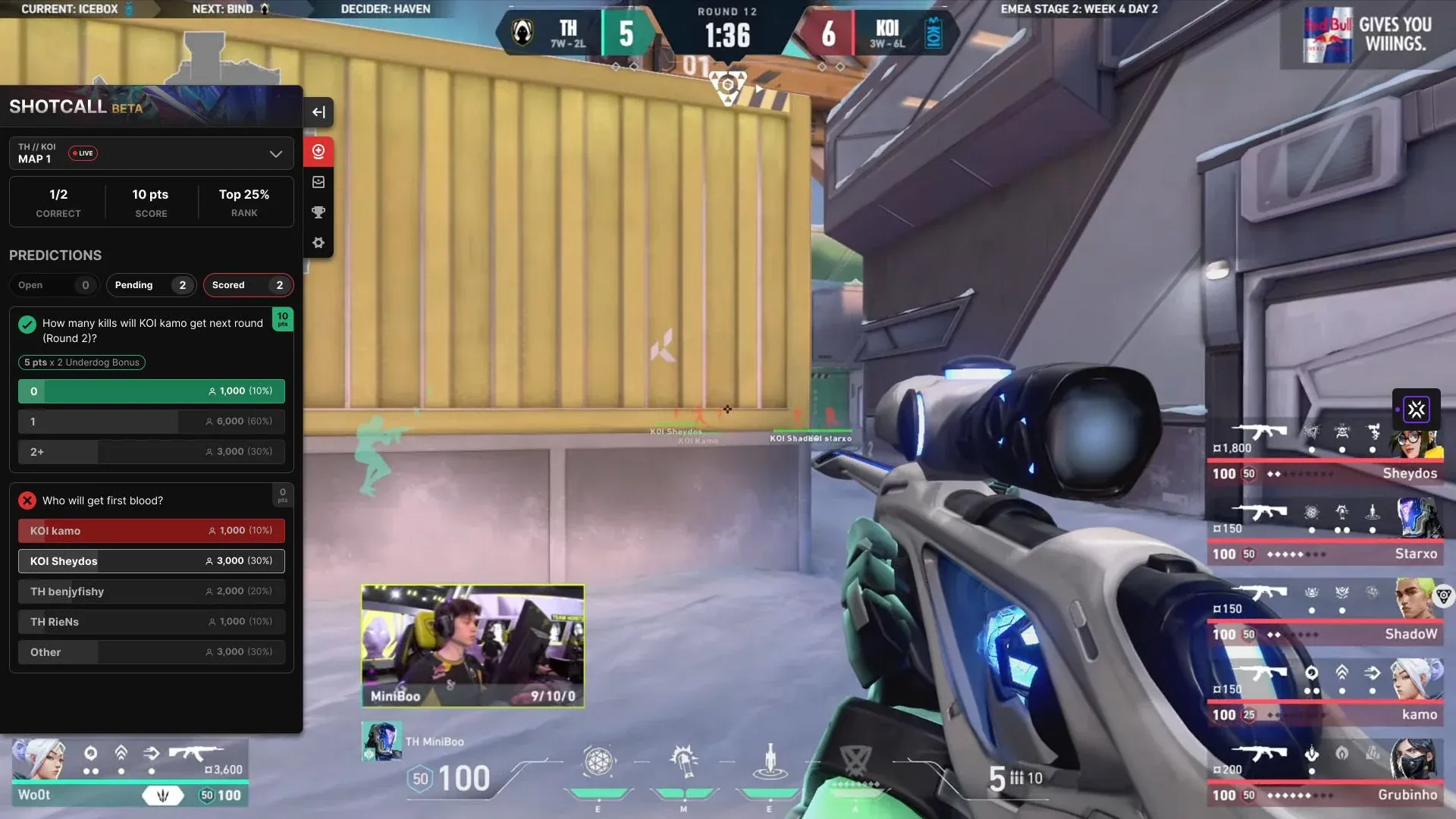
Shotcall is Riot's interactive prediction extension available on the Twitch desktop site. Viewers can make live predictions during official VCT broadcasts, earn points, and climb leaderboards, all while watching the matches in real time. It's a great way to stay engaged during playoff runs and put your game knowledge to the test.
Here are the key dates to keep in mind:
-
VCT Pacific & EMEA Playoffs: May 7–17
-
VCT Americas Playoffs: May 14–24
For the first four days of playoffs, players can make progress toward a pair of "Mystery Rewards." The nature of these rewards is being kept under wraps for now, and willl be revealed (and delivered, if earned) before the start of Americas Playoffs and ahead of the Pacific and EMEA conclusion on May 12.
Where to Play Shotcall
Shotcall runs directly on Twitch desktop web through official Riot broadcast channels. Head to the stream for your region and preferred language:
VCT Pacific
-
English: twitch.tv/valorant_pacific
-
Japanese: twitch.tv/valorant_jpn
-
Chinese (TW): twitch.tv/valorant_tw
-
Thai: twitch.tv/valorant_th
-
Indonesian: twitch.tv/valorant_id
VCT EMEA
-
English: twitch.tv/valorant_emea
-
Spanish: twitch.tv/valorant_es
-
French: twitch.tv/valorant_fr
-
Turkish: twitch.tv/valorant_tur
VCT Americas
-
English: twitch.tv/valorant_americas
-
Portuguese: twitch.tv/valorant_br
-
Spanish: twitch.tv/valorant_la
What's New This Season
Riot has rolled out a couple of quality-of-life updates to Shotcall for Stage 1 Playoffs:
-
Direct Valorant launch link: If you have VALORANT installed on your PC, new clickable spots have been added within the extension so you can jump straight into the game once the broadcast wraps up.
-
Language flexibility: Languages are no longer locked to each channel's primary broadcast language. You can now switch to your preferred language from the settings panel, regardless of which channel you're watching on.
How to Get Started
New to Shotcall? Getting set up only takes a minute:
- Go to any official Riot broadcast channel on Twitch desktop site
- Hover over the video player and click the red Crystal Ball icon on the left side of the screen
- Accept permissions and link your Riot ID
- Head to the settings tab to enable audio cues so you never miss a new question
- Wait for questions to appear and lock in your predictions before the timer runs out to earn points and climb the leaderboard
Eligibility and Support
To play Shotcall and receive rewards, you'll need to be on the Twitch desktop site and have a valid Riot account. Keep in mind that eligibility for prizes may vary by region due to local regulations.
Running into a problem? Check out the official FAQ first. If your issue isn't covered or you've spotted a bug, you can whisper "ModMeta" directly on Twitch for assistance.
Follow Strafe Esports for the latest VALORANT news and our X account for the latest content and coverage. Also, stay tuned to Strafe's channel on YouTube for exclusive interviews, press conferences, and more.
Featured image credit: Riot Games
Read More:
VALORANT Night Market Returns May 7: Complete List of Skins
Esports Nations Cup 2026 VALORANT Rosters: All Rumored and Confirmed National Teams